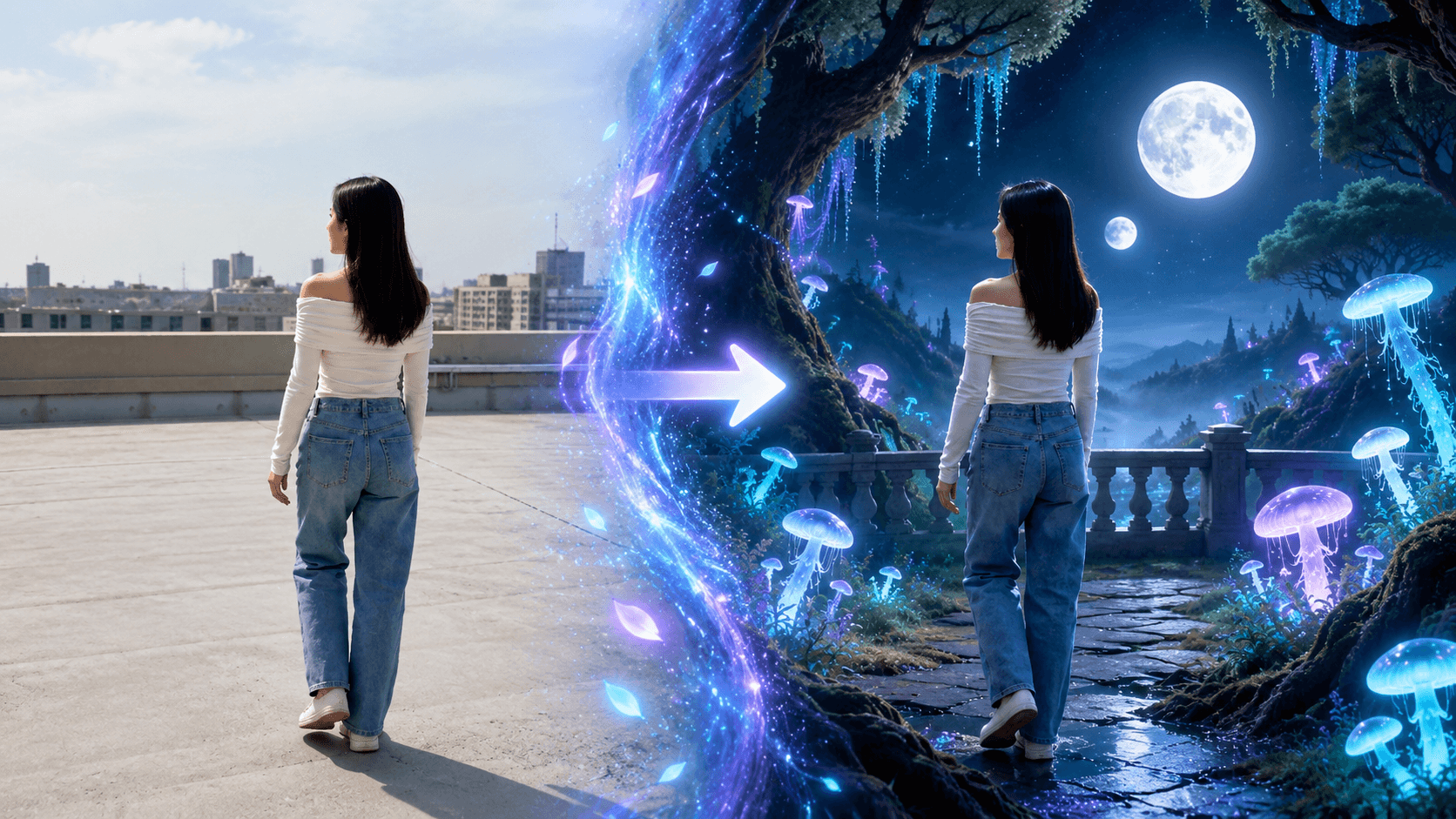
All you need is a simple follow-shot video. With JifChat's Seedance 2.0 Reference-to-Video, you can keep the person's movement and the camera exactly the same while the whole environment keeps switching throughout the video.
Shoot the raw footage (an original follow shot)
Find an open spot with a simple background, such as a rooftop, a plaza or an empty corridor.
The clearer the structure of the environment, the easier it is for the AI to fully transform the foreground, midground and background into different worlds.
Drag the video onto the JifChat canvas
Open JifChat Canvas and use a video upload node to drag your finished raw footage straight onto the canvas.
Generate the virtual scenes
To help the AI understand the style of each world you want more precisely, we recommend first generating 5 key scene images on the canvas as references for visual alignment and color style.
Click the + button on the left of the canvas to add an "Image Generator ", use a 16:9 ratio, and enter each world's prompt in turn to generate a separate concept image:
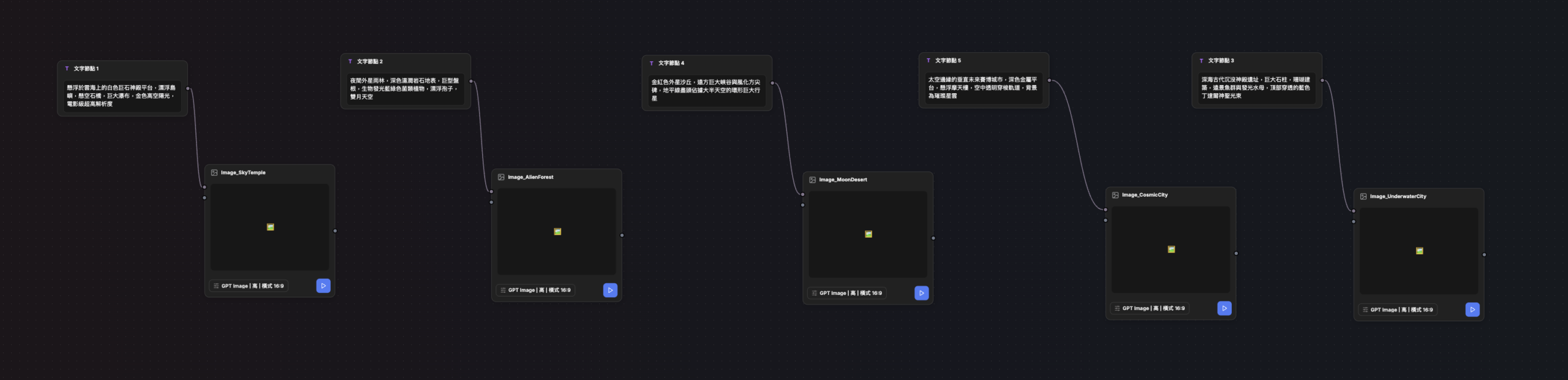
Sky temple:
A white megalithic temple platform floating above a sea of clouds, floating islands, suspended stone bridges, huge waterfalls, golden high-altitude sunlight, cinematic ultra-high resolution
Alien forest:
A nighttime alien rainforest, dark wet rocky ground, giant tangled roots, bioluminescent blue-green fungal plants, floating spores, a sky with two moons
Underwater city:
Ruins of an ancient sunken temple in the deep sea, huge stone pillars, coral architecture, distant schools of fish and glowing jellyfish, blue Tyndall god rays piercing down from above
Moon desert:
Golden-red alien sand dunes, a huge canyon and weathered obelisks in the distance, a giant ringed planet filling most of the sky at the edge of the horizon
Neon cosmic city:
A vertical futuristic cyber city at the edge of space, dark metal platforms, floating skyscrapers, transparent shuttle tracks in the air, a dazzling nebula in the background
Add a Video Generator
Click the + button on the left of the canvas and choose:
Video Generator

In the Video Generator, set:
- Model: Seedance 2.0 or Seedance 2.5
- Mode: Reference to Video
- Duration: 10 seconds
- Quality: choose the output quality you need
- Ratio: 16:9
Connect the raw follow-shot footage and the reference images
Connect each asset node on the canvas to the Video Generator's input ports:
Raw footage → Reference video
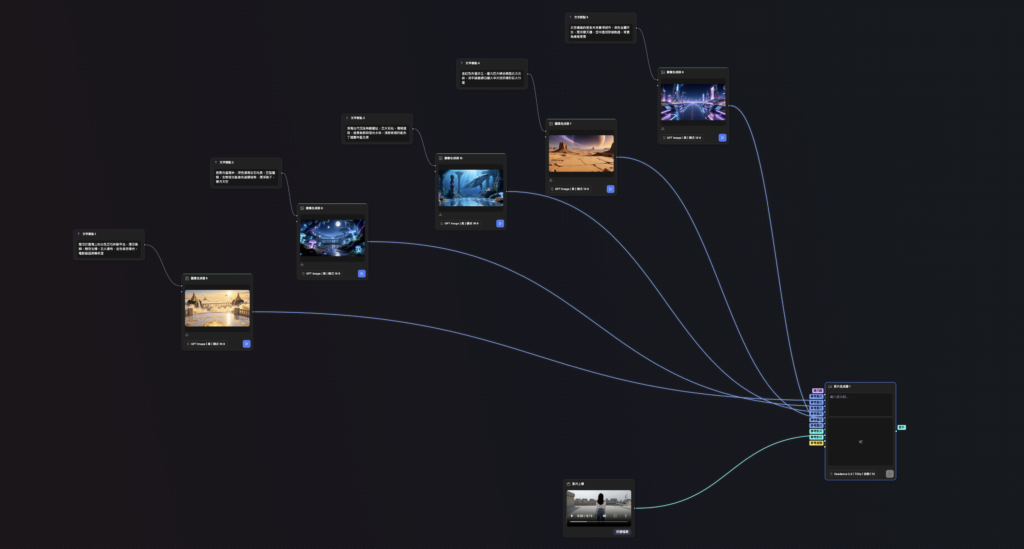
Connect the video input: connect the "Raw footage (original follow shot)" node to the Video Generator's video input port (Video Reference).
- The raw footage controls:
Connect the image inputs: take the 5 scene concept image nodes generated in Step 2.5
( @Image_SkyTemple, @Image_AlienForest, @Image_UnderwaterCity, @Image_MoonDesert, @Image_CosmicCity )
and connect them in order to the Video Generator's image reference ports (Image References / Multi-Image Inputs).
- The scene reference images control:
Paste the environment-transformation prompt
Paste the following prompt into the Video Generator:
Use the input video as the source of the subject's motion, and replace the environment by time segment using the matching scene reference image.
Strictly preserve the same girl from the original footage: her identity, face, hairstyle, body proportions, outfit and shoes.
Fully preserve her original walking speed, stride, arm swing, raising her hand to fix her hair, turning slightly to the right and continuing forward, with every movement at its exact original timing.
The camera must replicate the original footage with 100% accuracy: keep exactly the same starting position, following direction from behind, movement speed, distance to the subject, composition, camera height, perspective, lens characteristics and handheld feel.
Do not change, stabilize, smooth or redesign the camera movement. The girl and the camera must stay perfectly continuous across every world transition.
The video is in a fictional world from the very first frame. Every two seconds, the entire environment instantly switches to a completely different world.
Each transition must change the foreground, midground and background at the same time, including the ground, walls, buildings, city skyline, sky, materials, light, shadows, reflections and atmosphere.
Keep the position, size, outline, perspective and spatial relationships of the original scene's main geometry, and reinterpret them by strictly following the style, materials, color tone and terrain of the matching reference image:
0–2 seconds: Sky temple above the clouds
Reference @Image_SkyTemple
The girl is in a temple in the clouds, fully inheriting the white stone ground, floating islands, suspended stone bridges, magnificent waterfalls and bright golden high-altitude sunlight of @Image_SkyTemple.
2–4 seconds: Bioluminescent alien forest
Reference @Image_AlienForest
The whole world instantly turns into an alien forest at night, precisely showing the dark wet rocky ground, giant tangled roots, glowing blue-green plants, floating glowing spores and two-moon starry sky of @Image_AlienForest.
4–6 seconds: Lost underwater city
Reference @Image_UnderwaterCity
Instantly switch to deep-sea ruins, with an environment that fully matches the deep blue water, sunken temple pillars, coral terrain, distant fish and jellyfish, and natural light beams piercing the surface of @Image_UnderwaterCity. The girl keeps walking normally on the ground; do not make her swim, float or move in underwater slow motion.
6–8 seconds: Giant moon desert
Reference @Image_MoonDesert
Instantly switch to an alien desert, precisely recreating the golden-red dunes, weathered rock pillars, huge distant canyon and giant ringed planet filling the sky of @Image_MoonDesert.
8–10 seconds: Neon cosmic city
Reference @Image_CosmicCity
Instantly switch to a city at the edge of space, fully using the dark high-tech metal platforms, vertical floating skyscrapers, transparent sky tracks, flying vehicles and colorful cosmic nebula of @Image_CosmicCity.
Every environment transition must complete instantly and fully at the specified time, creating a clean, clear match-cut world replacement.
Only the world changes. The girl's position, identity, silhouette, movement, steps, hair, outfit and camera path must continue seamlessly across every transition point.
Do not use slow morphs, crossfades, dissolves, white flashes, portals, smoke wipes, magic particles or explosion transitions.
Do not let elements of the old world linger in the next one. Do not replace only the distant background; the foreground, midground and background must all transform completely at the same time.
Every world must be highly realistic and match the cinematic production quality of the reference images; do not turn into illustration, game graphics or cheap CGI.
Each world's ambient light, color temperature, shadows and reflections must naturally affect the girl, but must not change her identity, skin tone, outfit style or body proportions.
Do not add other people, monsters, chases, attacks, explosions or extra plot.
No flickering of the person, facial drift, outfit changes, wrong hands or feet, background jitter, geometric distortion, shifting buildings, duplicated objects, camera cuts, sudden zooms, slow motion, text, subtitles, logos or watermarks.
Keep the original 10-second duration, the original aspect ratio and a single continuous follow shot.
Completely remove the original audio and generate natural ambient sound to match each world. No music, narration, dialogue or singing.
Run the generation
Before generating, check that:
- The raw footage is connected to the Video Generator.
- Seedance 2.0 or Seedance 2.5 is selected.
- Reference to Video is selected.
- The duration is set to 10 seconds.
- The output ratio matches the original footage.
- The full prompt is pasted into the prompt field.
Finally, click the run button in the bottom-right corner of the Video Generator.
When it finishes, you'll have a cinematic environment-transformation video in which the person keeps walking forward while the world around her completely changes every two seconds.