With generative AI developing so quickly, there are plenty of imaging tools on the market, but very few truly fit the needs of Asian users or fully support Traditional Chinese. Today we're introducing creators to JifChat, an AI design tool built for Asian aesthetics. JifChat's core strengths are that it is "easy to use, precise and localized": it understands Traditional Chinese extremely well and has a large number of professional workflows built in. Better still, new users who sign up and complete tasks can get up to 9,400 free credits, making it easy to bring all kinds of wild ideas to life.
JifChat recently launched a game-changing new "Infinite Canvas" feature. It's a workspace without boundaries. On this endless canvas, every node, workflow, piece of text and image can be arranged freely, and you can pan and zoom the view however you like. This design frees you completely from the linear limits of a traditional chat box, as if you've become a film director surveying the whole production in your own digital studio. Today we'll put this powerful feature into practice and make a premium, commercial-quality promo video for the multimillion-dollar Ferrari SF90 Stradale supercar!
Step 1: Sign up and create your own blank canvas
First, open your browser, go to JifChat (https://chat.jif.dev/c/new) and sign up. After you log in, click "Node Canvas" on the screen, then click "or create a blank canvas". This wide-open space is where your creativity begins. Next, click the "+" icon on the canvas, then click "Text Node". This node will serve as the script for the whole promo video. Copy and paste the prompt below:
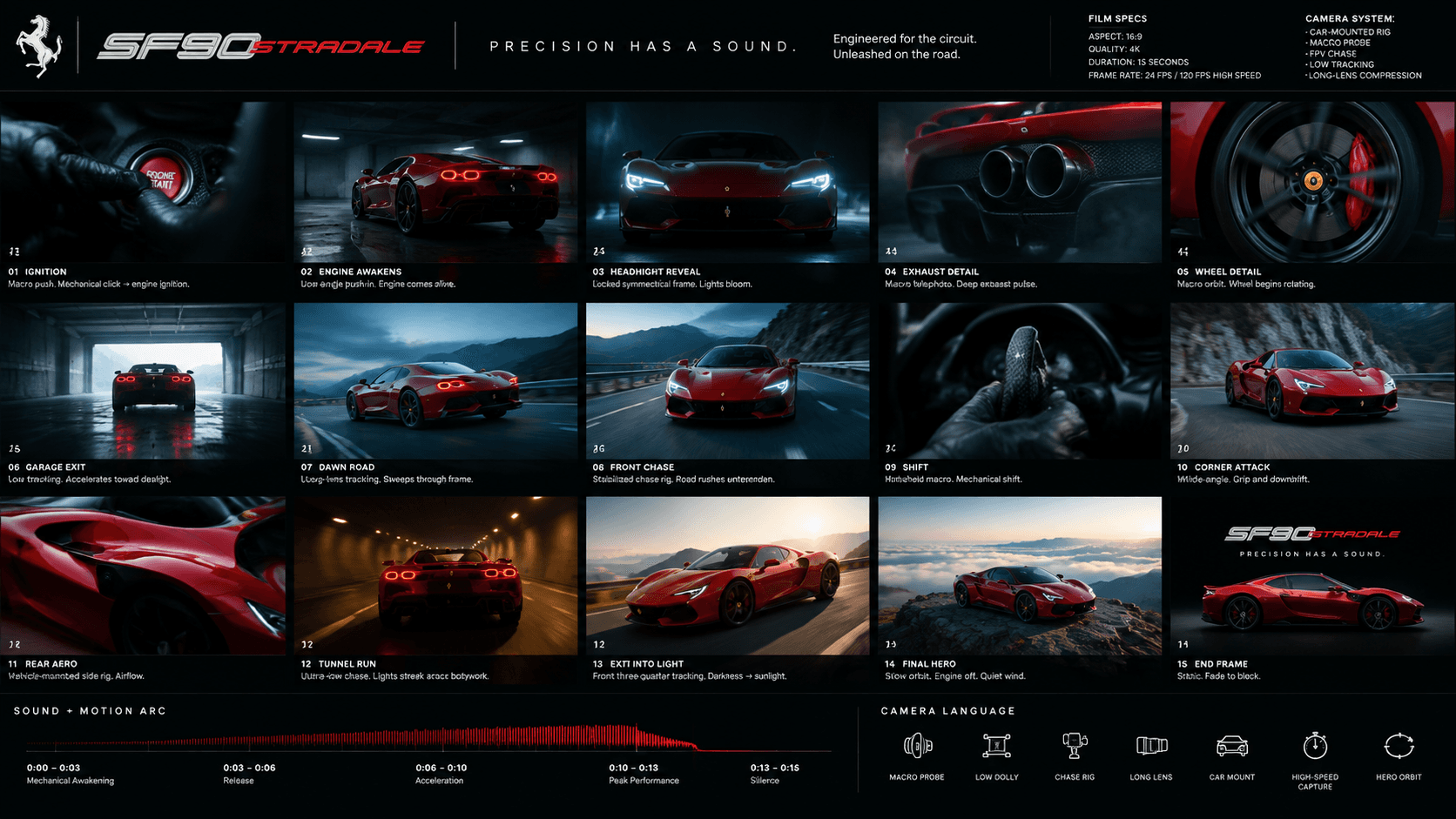
Create a premium cinematic advertising storyboard in 16:9 landscape format for a 15-second spec commercial featuring a Ferrari SF90 Stradale in classical Ferrari red.
The output should feel like a real automotive campaign treatment created by a world-class commercial director and automotive advertising agency.
Do not create a simple image grid.
Design the entire canvas like a polished production board containing 15 cinematic keyframes arranged in a clean 5 by 3 layout.
Each frame represents approximately one second of the final commercial.
VISUAL DIRECTION
Build the visual identity around:
Create strong contrast between quiet mechanical details and explosive driving sequences.
The Ferrari SF90 Stradale must remain visually consistent throughout every frame.
PRODUCT
Hero Vehicle
Ferrari SF90 Stradale
Keep the proportions, body shape, wheels, aerodynamic details, headlights, and exterior details consistent across every storyboard frame.
HEADER
Create a minimal automotive campaign header across the top.
“SF90 STRADALE”
“PRECISION HAS A SOUND.”
FILM SPECS
STORYBOARD FRAMES
01 — IGNITION
Extreme macro shot of the engine start button and driver's hand inside the dark cockpit.
Tight macro push.
Mechanical click followed by engine ignition.
Finger presses the starter.
02 — ENGINE AWAKENS
Rear three-quarter shot of the SF90 Stradale sitting inside a dark concrete garage.
Slow low-angle push-in.
Performance engine coming alive.
Subtle vibration travels through the car body.
03 — HEADLIGHT REVEAL
Close frontal shot as the sharp LED headlights illuminate through darkness.
Locked symmetrical frame.
Electrical activation tone.
Light blooms gradually toward camera.
04 — EXHAUST DETAIL
Extreme close-up of the rear exhaust outlets.
Macro telephoto shot.
Deep exhaust pulse.
Heat distortion ripples through the air.
05 — WHEEL DETAIL
Macro shot of the dark performance wheel, red brake caliper, and tire sidewall.
Slow circular macro orbit.
Metallic mechanical texture.
Wheel begins rotating.
06 — GARAGE EXIT
SF90 Stradale rolls slowly toward a bright opening at the end of the underground garage.
Rear low tracking shot.
Engine echo inside concrete space.
Vehicle accelerates toward daylight.
07 — DAWN ROAD
Wide cinematic shot of the red SF90 Stradale driving through an empty mountain road at blue hour.
Long-lens roadside tracking.
Engine climbing through gears.
Car sweeps rapidly through frame.
08 — FRONT CHASE
Camera races directly ahead of the Ferrari on an open road.
Stabilized chase rig.
Wind pressure and rising engine note.
Road markings rush underneath camera.
09 — SHIFT
Extreme interior close-up of the driver's hand changing gear.
Fast handheld macro.
Sharp mechanical shift.
Hand snaps through the gear change.
10 — CORNER ATTACK
SF90 Stradale enters a tight mountain corner at speed.
Low roadside wide-angle.
Tire grip and engine downshift.
Suspension compresses as the car rotates through the corner.
11 — REAR AERO
Close tracking shot across the rear aerodynamic bodywork while driving.
Vehicle-mounted side rig.
High-speed airflow.
Reflections race across the classical Ferrari red paint.
12 — TUNNEL RUN
SF90 Stradale explodes through a long modern tunnel illuminated by repeating amber lights.
Ultra-low rear chase shot.
Engine reverberates aggressively through the tunnel.
Tunnel lights streak across the bodywork.
13 — EXIT INTO LIGHT
The Ferrari exits the tunnel into bright early-morning sunlight.
Front three-quarter tracking shot.
Engine reaches a dramatic peak.
Exposure shifts from darkness into sunlight.
14 — FINAL HERO
SF90 Stradale parked alone on a mountain overlook above a sea of clouds.
Slow cinematic orbit.
Engine shuts down followed by quiet wind.
Soft sunrise reflection moves across the body.
15 — END FRAME
Minimal black campaign frame with the classical Ferrari red SF90 Stradale shown in side profile.
“SF90 STRADALE”
“PRECISION HAS A SOUND.”
Static.
Final mechanical click followed by silence.
Slow fade to black.
BOTTOM TIMELINE
Add a thin production timeline labeled:
“SOUND + MOTION ARC”
Mechanical Awakening
Release
Acceleration
Peak Performance
Silence
Add a subtle waveform representing engine intensity rising through the film before dropping sharply at the end.
CAMERA LANGUAGE PANEL
FINAL VISUAL QUALITY
Avoid
Step 2: Add and connect an "Image Generator"
Once the script is ready, we need to visualize it. Click the "+" icon on the canvas again, then click "Image Generator". Next, use your mouse to connect the "Text Node" to the "Image Generator" node. This simple action means you've successfully passed your text instructions to the AI engine.
Step 3: Set the parameters and produce a professional storyboard
You can adjust many different settings in the "Image Generator". For this project, to show off the ultimate beauty of the Ferrari SF90 Stradale, we use the "GPT Image 2" model and choose "High quality" and a "16:9" aspect ratio. When you're done, click the blue "Run" button. After a short wait, JifChat will generate a highly professional storyboard for you.
Step 4: Add a "Video Generator"
Now we'll make a video based on the storyboard we just generated and get the static Ferrari moving. Click the "+" icon on the canvas again, then click "Video Generator". Then copy the video prompt below and paste it into that node:
Create a 15-second ultra-realistic cinematic automotive commercial based on the provided storyboard.
Maintain the exact same classical Ferrari red Ferrari SF90 Stradale throughout every shot.
Preserve the vehicle design, aerodynamic details, headlights, wheels, brake calipers, body proportions, paint finish, and overall styling consistently.
The film begins in near silence.
STORYBOARD
00–0:02 | IGNITION
Extreme macro inside the dark cockpit.
A hand presses the engine start button.
Mechanical click.
The engine fires.
Cut immediately to a low rear three-quarter shot inside a dark concrete garage.
The car subtly vibrates as the engine comes alive.
02–0:04 | ENGINE AWAKENS
Sharp LED headlights illuminate.
Macro exhaust shot with visible heat distortion.
Fast macro shot of the wheel and red brake caliper.
The wheel begins rotating.
Engine note grows.
04–0:06 | GARAGE EXIT
Low tracking shot behind the SF90 Stradale as it accelerates out of the underground garage toward daylight.
Realistic suspension movement.
Reflections glide naturally across the classical Ferrari red body.
Concrete engine echo transitions into open-air sound.
06–0:08 | DAWN ROAD
Wide blue-hour mountain road.
The SF90 Stradale sweeps rapidly through an empty corner.
Cut to a stabilized low chase camera directly ahead of the vehicle.
Road markings rush beneath the lens.
Strong but realistic automotive motion blur.
08–0:10 | SHIFT
Interior macro.
Driver performs a fast gear shift.
Immediate exterior cut.
The SF90 Stradale attacks a tight mountain corner.
Suspension loads naturally.
Tires grip the asphalt.
Subtle dust reacts near the road edge.
No unrealistic drifting.
10–0:12 | TUNNEL RUN
Close vehicle-mounted tracking shot moving beside the rear aerodynamic bodywork.
Classical Ferrari red reflections streak over the bodywork.
Cut into a modern tunnel.
Camera follows extremely low behind the Ferrari.
Repeating amber tunnel lights flash rhythmically across the car.
Engine sound becomes loud and reverberant.
12–0:14 | EXIT INTO LIGHT
The SF90 Stradale accelerates toward the bright tunnel exit.
Camera transitions to a front three-quarter tracking shot as the car bursts into early-morning sunlight.
Natural exposure adaptation.
Warm sunlight sweeps across the classical Ferrari red paint.
Engine reaches its highest point.
14–0:15 | FINAL HERO
Hard cinematic cut.
The Ferrari SF90 Stradale is stationary on a mountain overlook above clouds at sunrise.
Slow subtle camera orbit.
Engine shuts off.
Only soft wind remains.
Finish on a minimal premium hero frame showing the SF90 Stradale in profile against a dark background.
Text
SF90 STRADALE
PRECISION HAS A SOUND.
Fade smoothly to black.
AUDIO
No music.
Build the entire soundtrack from realistic cinematic sound design:
The engine should function as the rhythm of the commercial.
CAMERA
Premium automotive cinematography.
Use natural camera inertia and realistic vehicle speed.
Avoid impossible camera movements.
LOOK
NEGATIVE / CONSISTENCY REQUIREMENTS
The final result should feel like a real premium European automotive campaign rather than an AI-generated video.
Step 5: Fine-tune the video parameters and control your budget
Likewise, you can adjust different settings in the "Video Generator". This time we use the powerful "Seedance 2.5 Reference-to-Video" model and set a "1080p" resolution, a "16:9" aspect ratio and a "15s" video length. Note in particular that high 1080p resolution uses a lot of credits. If you don't currently need enterprise-grade top image quality, we strongly recommend choosing 720p or even 480p instead, which will greatly reduce credit usage.
Step 6: Generate a top-tier video in one click
Once all the parameters are set, click the blue "Run" button. Generating this kind of high-quality video takes a lot of computation, so please wait patiently for a few minutes. When the progress bar finishes, JifChat will have generated a premium car promo video full of speed for you.
Step 7: Your Ferrari promo video is born!
All done! Above is the final video.
Why is JifChat's Infinite Canvas the ultimate weapon for AI creators?
Traditional AI tools often split images, text and video into separate tabs or chat boxes. Creators have to constantly copy and paste prompts, download images and upload them again to video tools, a process that is extremely tedious and makes it easy to lose details.
JifChat's Infinite Canvas completely changes the rules of the game:
- Visual, linked logic: every input and output appears as a node, and the lines show how data flows, so even a complex cross-media Workflow is clear at a glance.
- Nonlinear exploration: you can branch off on the canvas at any time to try different prompt styles or parameter settings without breaking the main flow you've already built.
- All your ideas in one place: from the first copy draft and reference images to the storyboard produced along the way and the final 1080p HD video, everything is kept in the same space, so you can zoom in on details or zoom out to see the whole picture at any time.
After this tutorial, you should know how to make the most of the Infinite Canvas on JifChat to create top-tier video content. Log in to (https://chat.jif.dev/c/new) right now, open a blank canvas and unleash your unlimited AI creative potential!