Still buying coloring books one at a time?
Whether you are a kindergarten teacher, an elementary school teacher, an after-school program teacher or a parent, you often need coloring pages on all kinds of themes for teaching materials, family activities or holiday worksheets.
But for many teachers and parents, finding suitable coloring pages takes a lot of time. Sometimes the images you find don't match in style, and sometimes you simply can't find material that fits your lesson theme. Drawing your own line art is also a challenge for anyone without a drawing background.
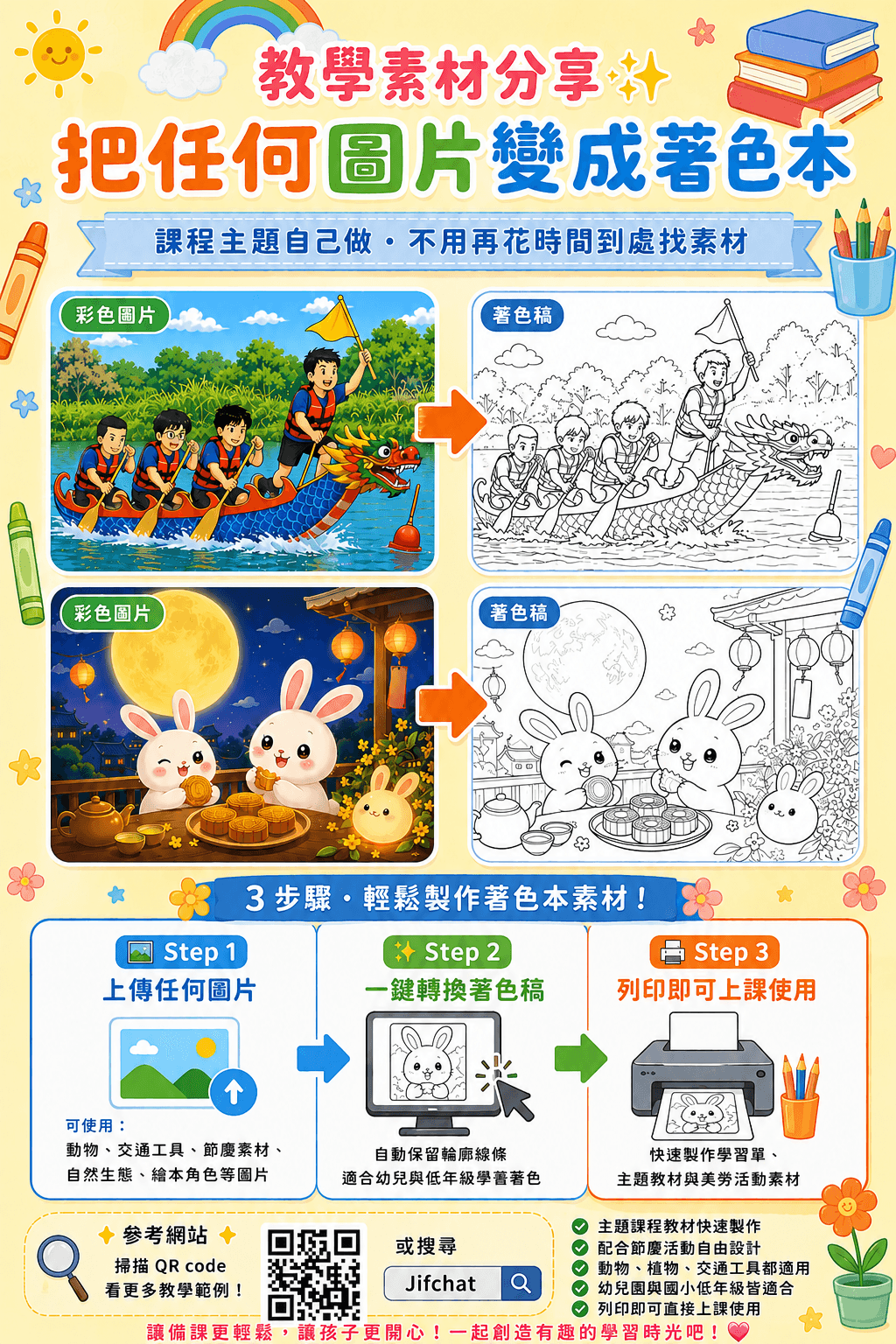
Now, with AI image tools, you can upload a single image and quickly turn it into printable black-and-white line art, and even add extra patterns and decorative elements to create your own custom coloring materials.
This article uses JifChat as an example to show how to make a kids' coloring book with AI. No drawing skills or complicated design software needed: you can quickly create coloring pages suited to teaching and family activities.
Table of Contents
- Why do teachers and parents use coloring books?
- Comparing three ways to make a coloring book
- How do you make a coloring book with AI?
- Complete step-by-step tutorial
- Real-world use case
- FAQ
What Is a Kids' Coloring Book?
A kids' coloring book is a learning and creative resource built around black-and-white line art. Through coloring, children practice observation, color matching, hand-eye coordination and creativity.
Common themes for kids' coloring books include:
- Animal coloring books
- Dinosaur coloring books
- Vehicle coloring books
- Holiday coloring books
- Zhuyin or English vocabulary coloring worksheets
- Story character coloring books
For teachers, coloring books are more than art activity material. They can also be paired with lesson themes and used as worksheets, activity sheets or extension materials in class.
What Lessons and Activities Can Kids' Coloring Books Be Used For?
Coloring books are widely used in kindergartens, lower elementary grades, after-school programs and parent-child learning activities, because they are easy to make, highly flexible, and can quickly be matched to different teaching themes.
For example:
- A Dragon Boat Festival lesson can use dragon boat coloring pages
- A Mid-Autumn Festival lesson can use coloring pages of the Jade Rabbit, the moon and mooncakes
- An animal-themed lesson can use coloring pages of cats, dogs, rabbits or sea creatures
- An English vocabulary lesson can pair letters with pictures to color
- Family activities can turn a child's favorite characters or photos into a coloring book
Through themed coloring activities, children can understand lesson content while they create, which also boosts engagement and interest in learning.
Comparing Three Ways to Make a Coloring Book
The most common ways to make a kids' coloring book today are drawing by hand, tracing in design software and generating automatically with AI.
If you just want to quickly make classroom materials or family activity resources, AI generation is usually the fastest method. Simply upload an image and the system helps turn it into black-and-white line art that's ready to print.
How Do You Make a Coloring Book with AI?
Many AI image tools can now help convert images into line art. Among them, JifChat offers a coloring book template: just upload an image to quickly generate a printable black-and-white coloring page.
The process can be simplified into four steps:
- Choose the coloring book template
- Upload an image
- Add decorative patterns
- Download and print
Here is the complete walkthrough.
Complete Step-by-Step Tutorial
1. Choose the Coloring Book Template
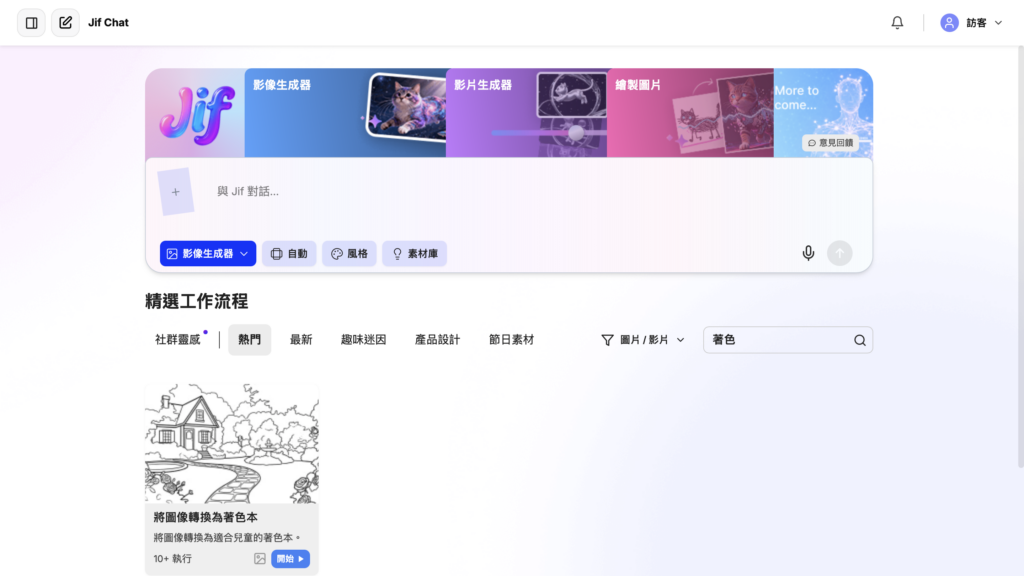
After opening JifChat, choose "Turn Image into Coloring Book" from the templates.
The system automatically applies layout settings suited to printing and coloring, turning your image into a black-and-white line art style.
That way you can get started quickly without writing complicated prompts.
2. Upload an Image
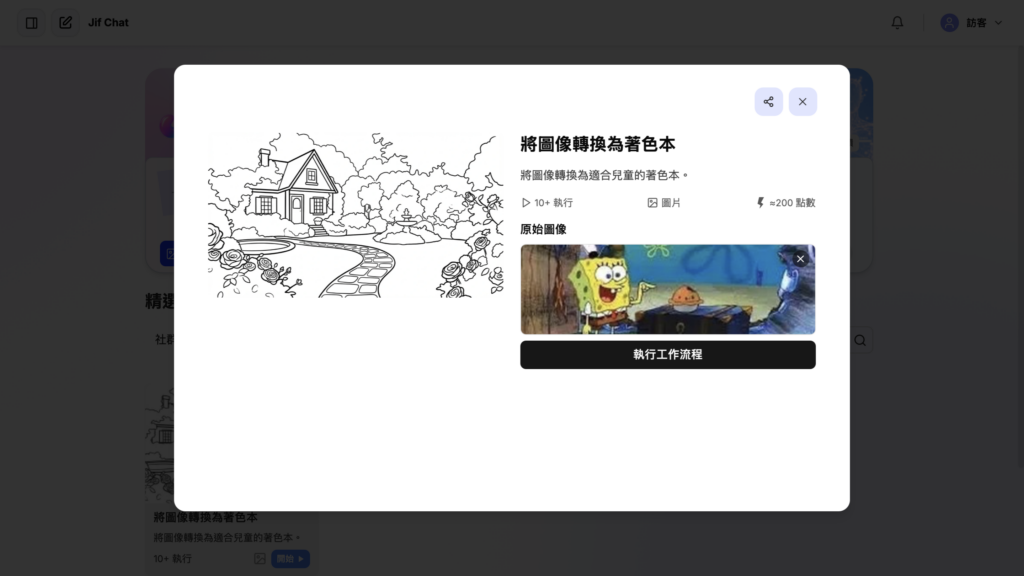
Next, upload the image you want to turn into a coloring page.
Photos, illustrations, teaching materials and even children's drawings can all serve as source material for a coloring book.
The system automatically recognizes what's in the image and converts it into black-and-white line art suitable for kids to color.
We recommend choosing images with a clear subject and a fairly simple background for the best results. If the background is too busy, the converted lines may end up dense, which can make coloring harder for kids.
3. Add Patterns and Decorative Elements
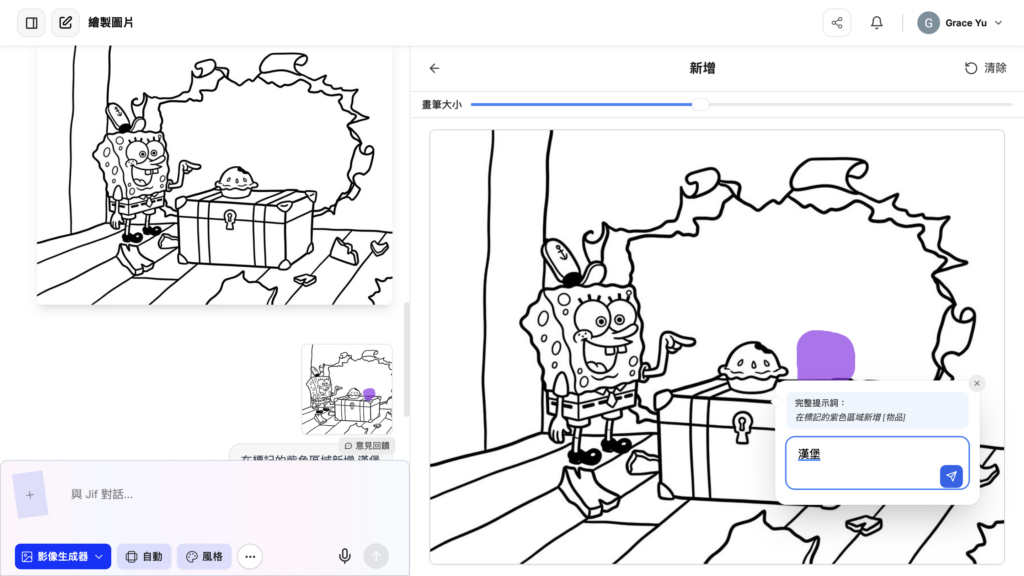
Once the coloring page is done, you can add extra decorative elements to match your lesson theme.
For example, holiday activities can include related patterns, animal themes can add natural scenery, and family activities can add more playful design elements to make the whole page more appealing.
With these small adjustments, the same image can become coloring pages that better fit different teaching situations and activity needs.
4. Download and Print
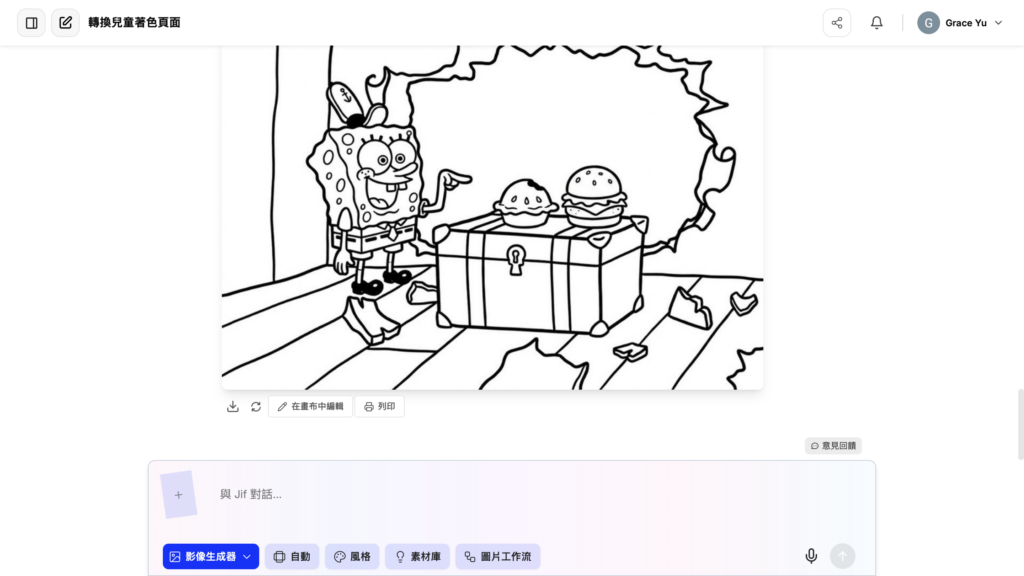
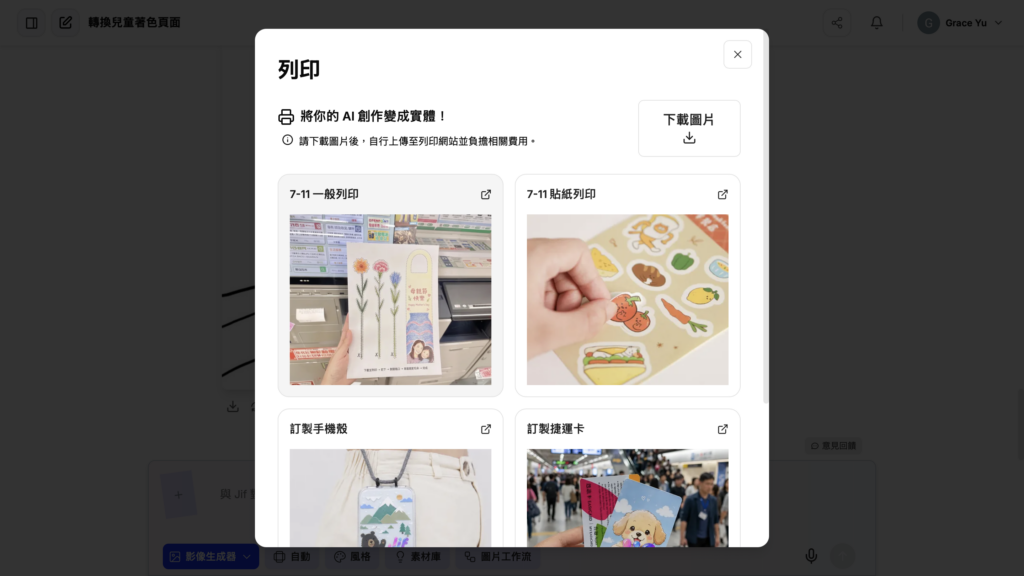
Before printing, we recommend checking that the lines are clear, the picture is complete and the overall layout looks the way you expect. Because results can vary slightly from image to image, making a few adjustments before exporting usually gives a better coloring experience.
When your design is finished, you can download the coloring book and print it. JifChat supports printing through ibon.
Once printed, the coloring book can be used right away for classroom materials, family activities, holiday lessons or art projects. Compared with spending time hunting for ready-made materials, making coloring books with AI lets you customize content to your lesson needs much faster, making material preparation far more flexible.
Real-World Use Case
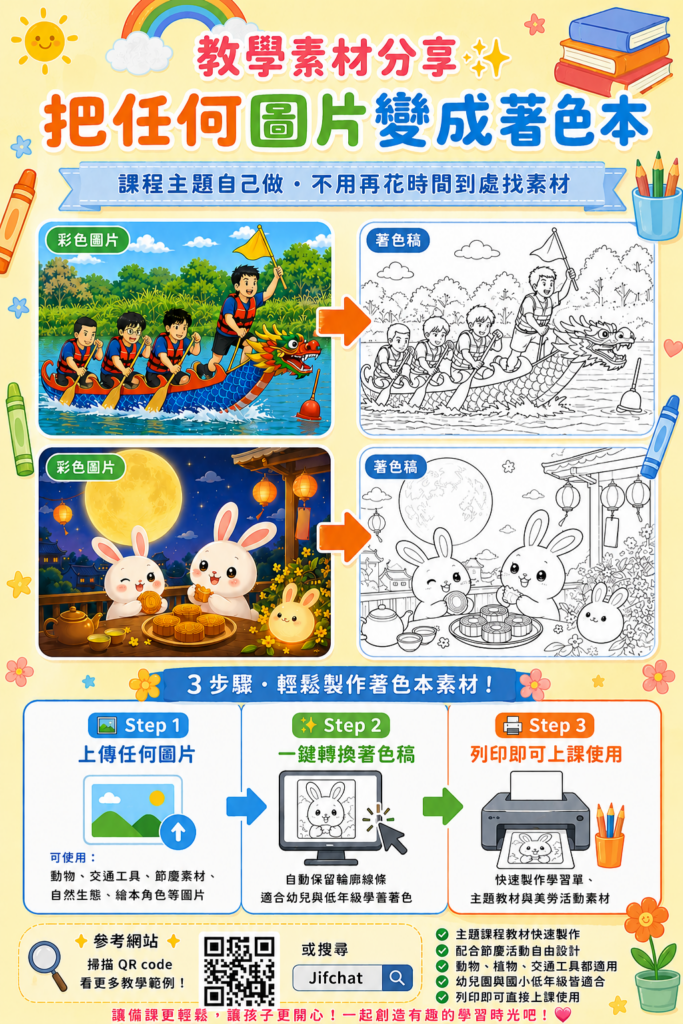
Take a Dragon Boat Festival lesson as an example: a teacher can upload a dragon boat image, quickly turn it into a dragon boat coloring page, and use it together with the story of the Dragon Boat Festival, an introduction to dragon boat racing or a holiday worksheet.
Beyond the Dragon Boat Festival, you can make coloring pages for any theme. This keeps materials closer to your lesson needs and avoids reusing the same images from the internet every time.
Conclusion
Making a kids' coloring book doesn't have to mean drawing by hand or spending time searching for ready-made materials. With AI image tools, teachers and parents can quickly turn images into printable black-and-white line art and add decorative elements to fit their lesson themes.
For kindergarten teachers, elementary school teachers, after-school program teachers and parents, AI is not just an image generation tool. It can also be a helpful tool for creating teaching materials.
Just master the four steps of "choose a template, upload an image, add patterns, download and print," and you can quickly create your own custom kids' coloring book, making teaching and family activities faster and more creative.
FAQ
Can AI turn a photo directly into a coloring page?
Yes. Just upload a photo or image and AI can help convert it into black-and-white line art for printable coloring book material.
What kinds of images work best as coloring pages?
Images with a clear subject, a simple background and distinct outlines usually work best, such as animals, vehicles, holiday objects, character illustrations or photos with a single subject.
Can coloring books be printed on A4?
Yes. Most coloring book templates are suitable for printing directly on A4 paper. Before printing, check that the lines are clear, the picture is complete and the layout is centered.
Can I make a coloring book without a design background?
Yes. With the AI coloring book template, you just choose the template, upload an image, then download and print. No drawing skills or experience with professional design software required.
Are AI-made coloring books suitable for teaching?
Yes. AI coloring books can be quickly customized to your lesson themes, such as holiday activities, learning about animals, art class, English vocabulary or parent-child learning activities.
Do AI-generated coloring books need a human check?
Yes. Before downloading and printing, we recommend checking that the lines are clear, the picture is complete, it's suitable for kids to color, and the content fits your teaching theme.