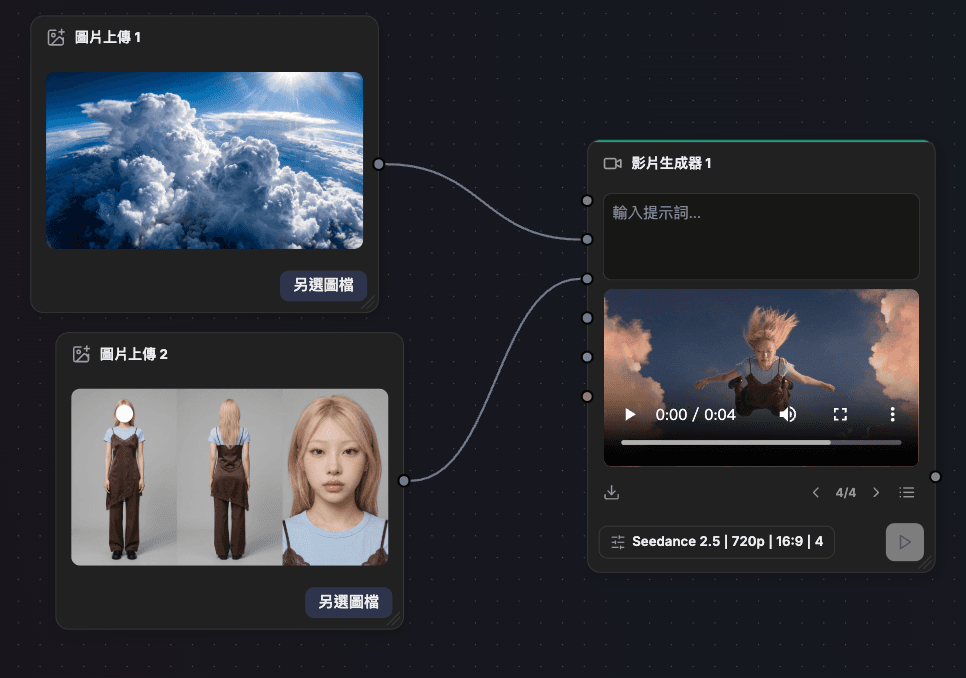
Want to make an AI video with consistent characters, cinematic camera work and precisely controlled motion? You actually don't need to keep switching between different tools.
In this demo, we'll create the character reference image, the environment reference image and the video all directly in (https://chat.jif.dev/canvas/new). JifChat now has (https://chat.jif.dev/c/new?afmc=1f), so you can do images and video in one go.
Create a character reference image in Canvas
First, in (https://chat.jif.dev/canvas/new), add:
Click the + button, then click "Text Node" + "Image Generator"
Connect the text node to the image generator, enter the character prompt in the text node, then choose the image model you want and generate.
If you already have a reference photo of a person, you can add it straight to the Canvas and use the Master Prompt below to build a Character Sheet.
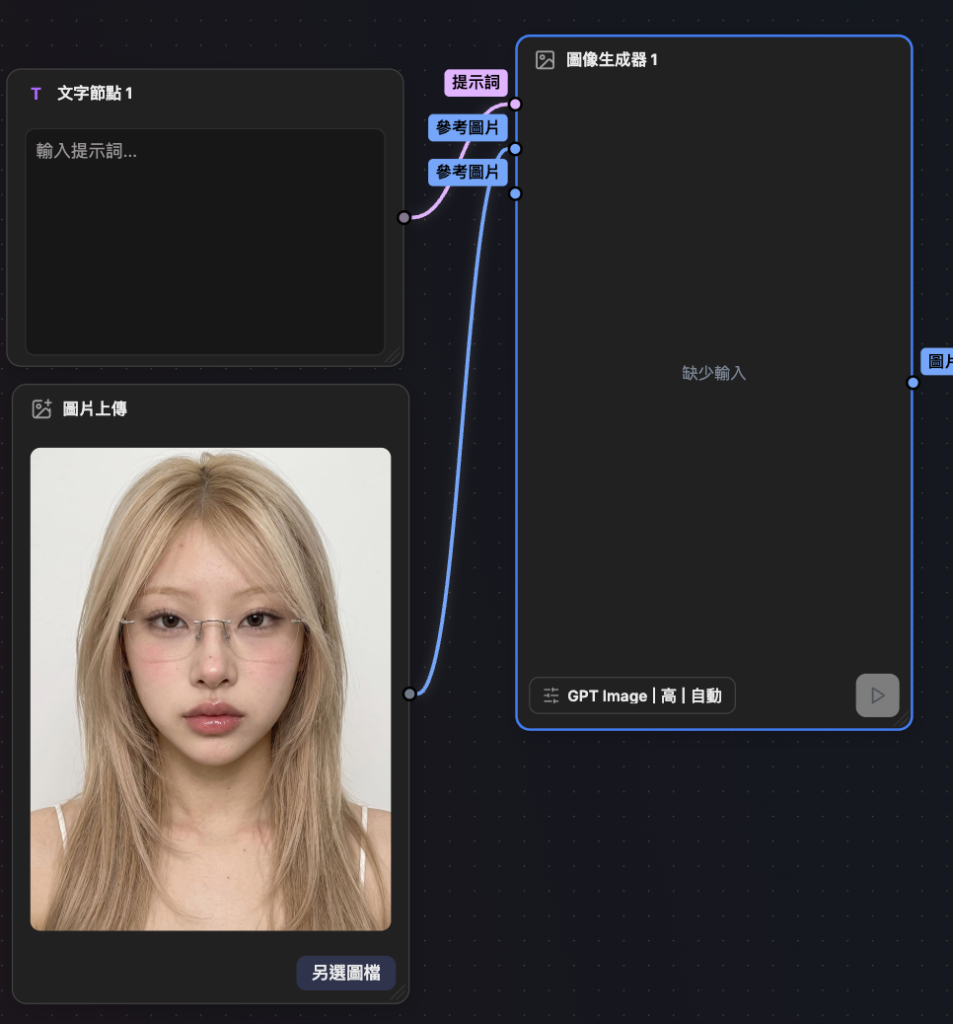
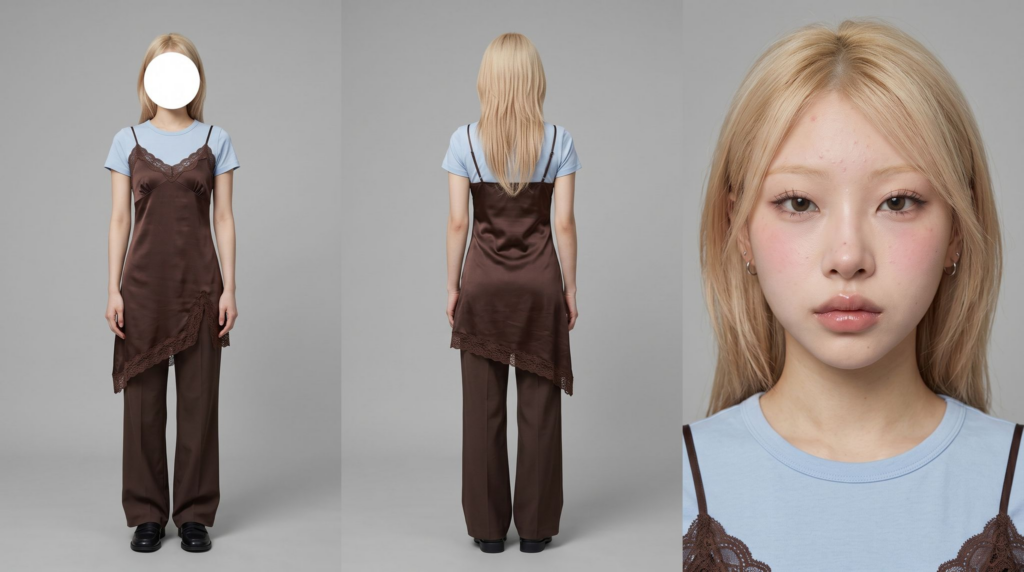
Film character sheet, highly realistic commercial studio photography. Create three views of the exact same female model, with her identity strictly based on the uploaded character reference image. Fully preserve her facial identity, facial proportions, hairstyle, hair color, skin tone, age and body proportions. She has a slim, tall model figure and long legs, and wears no glasses. The outfit is based entirely on the uploaded outfit image, with no handbag, and the outfit must be exactly the same in all three views. Keep the same makeup, natural skin texture, glossy lips and minimalist small silver hoop earrings. The three views stand side by side in front of a seamless neutral gray #B8B8B8 studio backdrop. Panel 1: full-body front view, standing naturally upright in a relaxed pose, facing the camera, head level, fully in frame from head to toe. The center of the face is covered by a flat, opaque, pure white circular mask that completely covers the whole face from forehead to chin, like an anonymous model casting photo, with clean, crisp edges on the white circle. Panel 2: full-body back view, facing completely away from the camera, fully in frame from head to toe, with exactly the same hairstyle, outfit, body proportions and accessories as the front view. Panel 3: an extreme close-up of the face from the front, looking directly into the camera, eyes in sharp focus, keeping natural skin texture, visible pores, real eyelashes, delicate natural makeup and glossy lips. The person in all three views must be exactly the same person, with consistent outfit, hairstyle, makeup, accessories and overall styling. Use soft, even studio lighting with natural falloff, a clean commercial catalog photography style, clear fabric details, realistic skin and accurate body proportions. No plastic AI look, no excessive skin smoothing, no AI gloss.
After it's generated, keep this image on the Canvas; it will be the character reference for the video.
Generate a cloud environment reference image
Next, create another set:
"Text Node" + "Image Generator"
Connect the two nodes, choose any image model, and enter the scene prompt in the text node.
A high-altitude wide-angle shot captures a vast, striking expanse of billowing cumulus and cumulonimbus clouds surging up into a bright blue sky. The clouds have intricate textures and sharply defined edges, and their fluffy, voluminous surfaces create an illusion of depth and immensity. Strong sunlight pours down from the upper right, forming scattered, dazzling beams and lens flare, lighting the cloud tops with specular highlights while casting deep, cool shadows below, giving the whole scene the feel of a three-dimensional sculpture. The main tones are bright white and subtle blue, in sharp contrast with large areas of dark gray shadow and the rich azure of the upper sky. The photo has a very deep depth of field, with the entire frame precisely in focus and sharp. It was most likely taken with a high-resolution digital camera (possibly from an airplane), capturing tiny details precisely with almost no noticeable noise or grain. The overall mood is majestic and awe-inspiring, evoking the serenity and grandeur of the natural atmosphere. There are no people in the frame. HEX color values:
This image will mainly control:
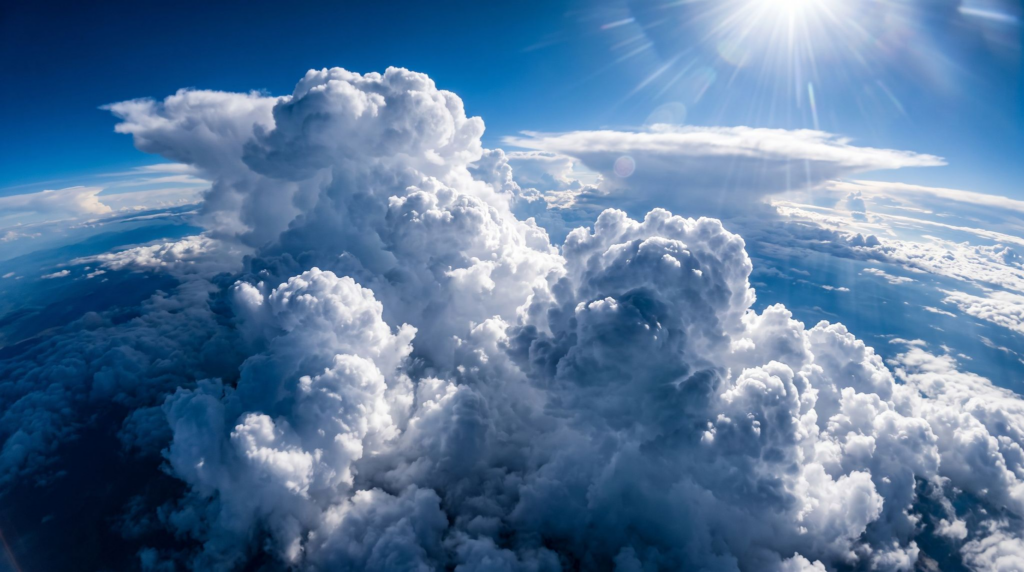
The cloud shapes, spatial scale, mood and overall world.
The video model can still readjust the sunrise lighting and Camera Angle based on the prompt.
Connect the character image + environment image to the video generator
On the Canvas, click:
+ → Video Generator
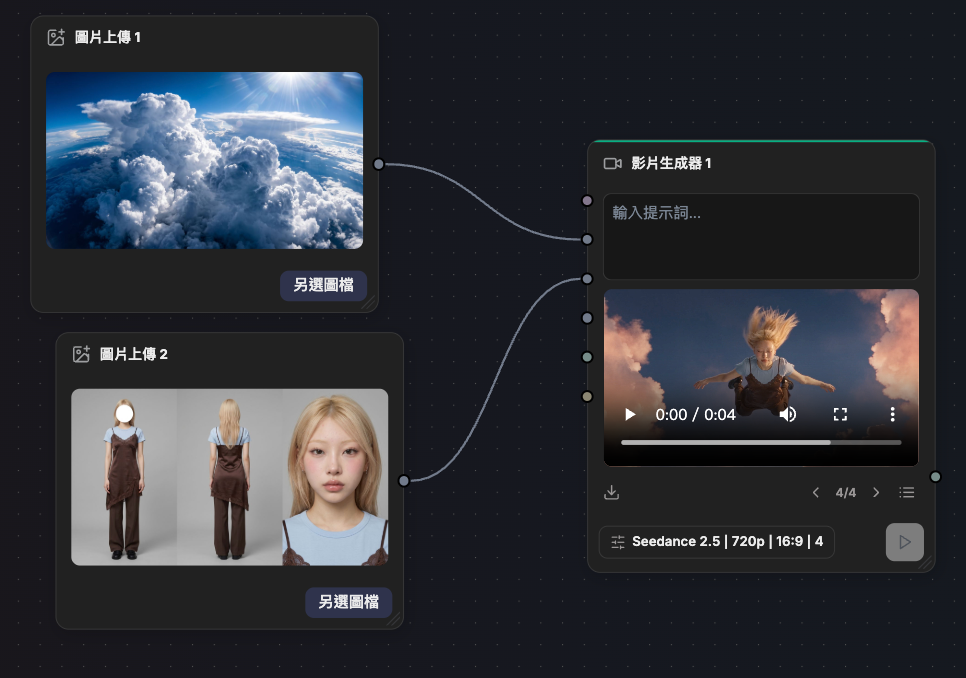
Choose the video model you want to use, such as Seedance.
Then connect:
- Character Sheet
- Cloud Environment

to the video generator.
Format:
- 9:16
- The main video length can be set to about:
- 12 seconds
Then enter the prompt below in the text node.
Generate the main video: losing balance in the clouds → sitting down → falling
Scene setup
A single continuous vertical shot: at sunrise, a young woman is in free fall above a vast sea of clouds. The camera is directly below her, shooting upward as she falls toward the lens at high speed; the powerful airflow makes her clothes flap violently. Her expression is completely calm: this fall is her own choice.
Active references
a young woman with long, layered blonde hair. Her outfit must match the reference image 100%. Ignore the garage background in the reference image.
scene reference: a towering, enormous sea of cumulus clouds. Use it only to control the shape, scale and overall mood of the clouds; do not reference its camera angle, composition or time of day. Rebuild the whole scene in sunrise light.
Scene space
The scene is in open sky between cloud layers. Above the falling woman is bright sky, deep blue overhead, gradually shifting to warm gold near the horizon. At the edges of the frame, the outlines of huge cumulus towers lit by the sunrise are visible. The camera is in the open air below her, free-falling with her at a slightly slower speed.
First frame and spatial position
First frame: a medium shot from directly below the falling woman, with the camera pointing straight up. @Image upload is in the center of the frame, fully visible from about the knees to the head. Her body is relaxed, chest down, falling toward the camera, arms spread out to the left and right. The background is a wide, bright sky, with the edges of the frame surrounded by glowing giant cloud towers. From the very first frame, her clothes and hair are already being whipped upward by the strong airflow, away from the camera.
Format
Vertical 9:16, single continuous shot, 6 seconds.
Lens and focal length
Use a medium shot with a moderately wide lens. Close enough to clearly see the fabric details and her calm facial expression, while wide enough that the sky and the edges of the surrounding clouds naturally frame her.
Camera
Use a continuously unstable handheld look for the whole video: the camera constantly has noticeable rough shake, unstable framing, small violent jolts and natural drifting corrections, as if the camera operator is free-falling through the sky with her. She falls slightly faster than the camera, so throughout the video she slowly gets closer to the lens and gradually grows larger in the frame. The frame also slowly rotates a few degrees. The camera shake must never fully settle from the first second to the last.
Action timing
0–6 seconds: continuous free fall. Her body stays horizontal, flying/falling forward, chest down, head slightly raised, arms fully spread to the left and right like wings. Her legs are bent back and apart, knees bent and feet raised, forming a relaxed, natural "flying/floating" pose. Her body stays soft and relaxed, arms open, fingers naturally spread, with her limbs drifting only slightly, slowly, as if weightless. Her eyes are closed, her face completely calm, with the faintest smile.
The main motion in the frame comes from her clothes: her loose blue T-shirt and white long sleeves are hit by the high-speed airflow, violently billowing upward, flapping and whipping, vibrating constantly in fast, chaotic waves; her loose leopard-print shorts also whip wildly around her legs; her long hair is pulled straight up and flies violently, occasionally sweeping across the top of the frame. Thin wisps of cloud rush past between her and the camera at high speed.
Physics
Use the wind behavior of a real terminal-velocity free fall: the fabric flaps violently at high frequency, with strong, fast whipping and oscillation; the cuffs and hem quickly billow out and then collapse; the hair whips violently with clear weight and inertia. Her limbs keep a slow, weightless drift while her clothes stay in constant violent high-speed motion. The contrast between the "calm body" and the "violently flapping clothes" is the most important visual core of this shot. Clouds rushing past further strengthen the sense of speed as she falls.
Lighting
A low golden sunrise lights her from the side. Warm amber light sweeps across her body, clearly lighting every fold and ripple of the rapidly flapping fabric, while creating a strong rim light along the edges of her hair that contrasts with the deep blue sky above. The giant cumulus towers at the edges of the frame are lit by peach and rose-gold sunrise light.
Sound
Deep, intense free-fall wind noise, close-miked violent fabric slapping and rapid fluttering, and intermittent high-pitched wind whistling. No music, no dialogue; the intense wind completely drowns out breathing, and her breathing does not need to be heard.
Style
Highly realistic live-action cinematic look. Slightly desaturated cinematic grading in warm Golden Hour tones, including peach, amber and soft violet-blue shadows. Fine analog film grain, soft natural contrast.
Image quality requirements
Her face and body pose must be clearly recognizable. Fast-moving clothes and hair have natural cinematic Motion Blur. Stable temporal continuity: no ghosting, no duplicated limbs, no dropped frames or stutter.
Positive constraints
Only one person may appear in the whole video: @Image1. Her outfit must match the reference image exactly. From the first second to the last, her face stays calm and her eyes stay closed. The camera must always stay directly below her, shooting upward, and keep shaking from start to finish. The violent high-speed fluttering of her clothes must run through the entire shot and never fully calm down at any point.
Strong Anamorphic cinema lens characteristics: noticeable horizontal squeeze, oval bokeh, horizontally stretched highlights, curved barrel distortion at the edges of the frame, and chromatic aberration that grows stronger toward the edges.
No Lens Flare.
No light trails.
No floating bokeh specks.
Generate one more free-fall shot
If you want a richer rhythm for your Reels, you can also generate a close-up falling shot of about 4 seconds and cut it into the main video.
Again, use:
Character Sheet + Cloud Environment
But this time, make just one Continuous Shot.
Scene setup
A single continuous vertical shot: at sunrise, a young woman is in free fall above a vast sea of clouds. The camera is directly below her, shooting upward as she falls toward the lens at high speed; the powerful airflow makes her clothes flap violently. Her expression is completely calm: this fall is her own choice.
Active references
a young woman with long, layered blonde hair. Her outfit must match the reference image 100%. Ignore the garage background in the reference image.
scene reference: a towering, enormous sea of cumulus clouds. Use it only to control the shape, scale and overall mood of the clouds; do not reference its camera angle, composition or time of day. Rebuild the whole scene in sunrise light.
Scene space
The scene is in open sky between cloud layers. Above the falling woman is bright sky, deep blue overhead, gradually shifting to warm gold near the horizon. At the edges of the frame, the outlines of huge cumulus towers lit by the sunrise are visible. The camera is in the open air below her, free-falling with her at a slightly slower speed.
First frame and spatial position
First frame: a medium shot from directly below the falling woman, with the camera pointing straight up. @Image upload is in the center of the frame, fully visible from about the knees to the head. Her body is relaxed, chest down, falling toward the camera, arms spread out to the left and right. The background is a wide, bright sky, with the edges of the frame surrounded by glowing giant cloud towers. From the very first frame, her clothes and hair are already being whipped upward by the strong airflow, away from the camera.
Format
Vertical 9:16, single continuous shot, 6 seconds.
Lens and focal length
Use a medium shot with a moderately wide lens. Close enough to clearly see the fabric details and her calm facial expression, while wide enough that the sky and the edges of the surrounding clouds naturally frame her.
Camera
Use a continuously unstable handheld look for the whole video: the camera constantly has noticeable rough shake, unstable framing, small violent jolts and natural drifting corrections, as if the camera operator is free-falling through the sky with her. She falls slightly faster than the camera, so throughout the video she slowly gets closer to the lens and gradually grows larger in the frame. The frame also slowly rotates a few degrees. The camera shake must never fully settle from the first second to the last.
Action timing
0–6 seconds: continuous free fall. Her body stays horizontal, flying/falling forward, chest down, head slightly raised, arms fully spread to the left and right like wings. Her legs are bent back and apart, knees bent and feet raised, forming a relaxed, natural "flying/floating" pose. Her body stays soft and relaxed, arms open, fingers naturally spread, with her limbs drifting only slightly, slowly, as if weightless. Her eyes are closed, her face completely calm, with the faintest smile.
The main motion in the frame comes from her clothes: her loose blue T-shirt and white long sleeves are hit by the high-speed airflow, violently billowing upward, flapping and whipping, vibrating constantly in fast, chaotic waves; her loose leopard-print shorts also whip wildly around her legs; her long hair is pulled straight up and flies violently, occasionally sweeping across the top of the frame. Thin wisps of cloud rush past between her and the camera at high speed.
Physics
Use the wind behavior of a real terminal-velocity free fall: the fabric flaps violently at high frequency, with strong, fast whipping and oscillation; the cuffs and hem quickly billow out and then collapse; the hair whips violently with clear weight and inertia. Her limbs keep a slow, weightless drift while her clothes stay in constant violent high-speed motion. The contrast between the "calm body" and the "violently flapping clothes" is the most important visual core of this shot. Clouds rushing past further strengthen the sense of speed as she falls.
Lighting
A low golden sunrise lights her from the side. Warm amber light sweeps across her body, clearly lighting every fold and ripple of the rapidly flapping fabric, while creating a strong rim light along the edges of her hair that contrasts with the deep blue sky above. The giant cumulus towers at the edges of the frame are lit by peach and rose-gold sunrise light.
Sound
Deep, intense free-fall wind noise, close-miked violent fabric slapping and rapid fluttering, and intermittent high-pitched wind whistling. No music, no dialogue; the intense wind completely drowns out breathing, and her breathing does not need to be heard.
Style
Highly realistic live-action cinematic look. Slightly desaturated cinematic grading in warm Golden Hour tones, including peach, amber and soft violet-blue shadows. Fine analog film grain, soft natural contrast.
Image quality requirements
Her face and body pose must be clearly recognizable. Fast-moving clothes and hair have natural cinematic Motion Blur. Stable temporal continuity: no ghosting, no duplicated limbs, no dropped frames or stutter.
Positive constraints
Only one person may appear in the whole video: @Image1. Her outfit must match the reference image exactly. From the first second to the last, her face stays calm and her eyes stay closed. The camera must always stay directly below her, shooting upward, and keep shaking from start to finish. The violent high-speed fluttering of her clothes must run through the entire shot and never fully calm down at any point.
Strong Anamorphic cinema lens characteristics: noticeable horizontal squeeze, oval bokeh, horizontally stretched highlights, curved barrel distortion at the edges of the frame, and chromatic aberration that grows stronger toward the edges.
No Lens Flare.
No light trails.
No floating bokeh specks.
Combine the two videos
The main video builds the story
- 1Losing balance
- 2sitting down
- 3deciding to jump
- 4falling
The second clip can be inserted into the falling section, adding a stronger shot of her:
arms spread wide, free-falling toward the sky.
That way the whole Reel isn't just showing "an AI girl falling from the clouds" but has a clear emotional arc
- 1Danger
- 2stillness
- 3letting go
- 4free fall
Finally, just open (https://chat.jif.dev/c/new) and try putting the character, the scene, the prompts and the video generation all into one Workflow.